I’ve checked permissions and you should be able to create posts in the Development / Github category. If you have issues anyhow, post a screenshot and description in the Site Feedback category.
I moved the topic where it belongs. This is done by editing the title. I suspect, that you as author, should have permission to change the category too. Just click on the pencil that appear behind the title, when you hover the mouse over it.
Concerning your zooming experience, you can prove this with the latest AppImage. If it has the same issue, it might be code related.
Or it is related with the DXF file? Have you tried other files or does a new file with only one entity behave alike?
Have you build release or debug version? The debug version might be slower than the release.
potential regression in rendering so performance is degraded.
Please zip dxf and attach it there - or, even better - create issue directly on GitHub - Issues · LibreCAD/LibreCAD · GitHub
If you can’t share specific dxf - please try provide as much information about is as you can
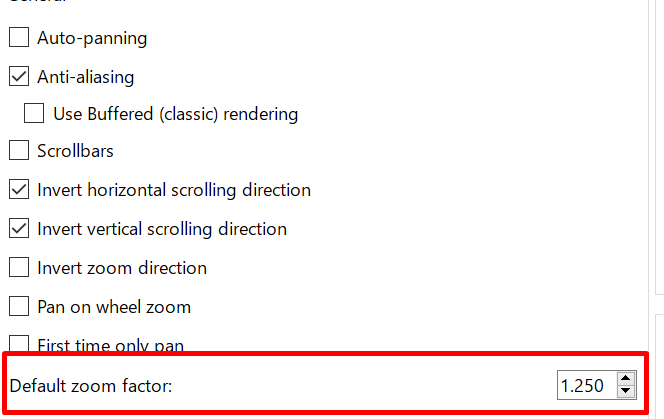
If this is not related to rendering - please check current zoom factor in Application Preferences, it controls how fast the zooming is performed.
I originally misinterpreted the symptoms. It is not slow. It stutters and skips, which in limited testing felt like slow response. The three versions I compared (the two mentioned earlier plus the appimage) all do that, but with a different enough feel to their behaviors that I incorrectly thought it was a new problem.
It now feels like scroll wheel input events are somehow processed out of original sequence.
I don’t think I can give enough info to make this a valid issue report. But knowing it is not a straight performance problem gets me much closer to being able to add debug message to nail down a better diagnosis.
I’m juggling this task against many others. So I can’t promise I will research it better. But I hope to.
Interestingly, my forum difficulties in selecting the category are apparently also scroll wheel issues. I use the same scroll wheel in several other applications constantly with no such issues, making these two problems a bizarre coincidence (I wouldn’t believe it if someone told me). I thought I was getting only 3 choices for category and development wan’t one of them and thought I couldn’t reach the other choices, because I tried things and none of them worked. But knowing the scroll wheel is the way to reach other choices, I tried it until it works and it does. So I tried a different mouse: same behavior. Intermittent scroll wheel function in LibreCAD and in that one control of this forum. But works fine in the same browser for every other site.
Thakyou to both replies I received above.
Edit: One more key fact, that I’ll try to use to guide the addition of diagnostics: The problem goes away with a smaller window size. With a big window on a 4K monitor using 85% Wayland scaling to get even more pixels, all on an underpowered computer, I get the symptom. With a smaller window, no symptoms, I assume the processing can keep up with the incoming events and by keeping up, eliminates any chance of even skipping (much less out of sequence processing) of the resulting secondary events.
In case it is unclear, the 85% scaling meaning the program generates more pixels than the screen can actually display, all (in my case) to keep the physical dpi on my giant monitor the same as on the merely big 2K portrait mode monitor beside it. Very wasteful, I know, but hadn’t caused me any problems before this.
If you have an ordinary mouse and a fast enough computer, that change changes nothing.
If you have an ordinary mouse and not a fast enough computer, this fixes a serious problem.
If you have a mouse with a higher resolution scroll wheel, this code change must be compensated for by increasing the ZoomFactor setting, after which it fixes a problem if your drawing+resolution is large relative to CPU speed and does nothing if you needed nothing.
But if you routinely switch between mice with different resolution scroll wheels, this change introduces a behavior change you might dislike (or in other cases might fix a misfeature).
I don’t know enough about what hardware other users have, to know whether to push for this change (vs. stopping at: I need it and I can keep it in my copy of the source code different from the github copy).
Also, combining this change with setting a lower ZoomFactor gives me better control over zooming. I can then turn the wheel fast to get approximately the zoom level I want and then slow down to get exactly the level I want. Without this change (with just the lower ZoomFactor) I would need a far faster computer for that usage to work, because turning the wheel faster just makes it miss more.
What I suggested is not exponential. It is exactly linear zoom. I know the “pow” looks exponential if you don’t study the problem.
Linux or QT6 (still don’t know which) combines multiple clicks of the mouse wheel into one event, when the processing of the previous click is slow.
The bug is that the program receives that multi-click event and processes only one click.
So (before fixing the bug) if I turn the wheel fast, I get far less total zoom than turning the same amount very slowly.
My change just fixes the bug: When it gets an event representing N wheel clicks, it processes that event to get the effect of N wheel clicks in one update (instead of processing one and missing the rest).
As far as people not complaining, I’m certain I’m not the only person who used LibreCAD with a high resolution display on a complex drawing without a super fast computer. The usual reaction is not to complain, but to conclude that failures like this are why people buy expensive CAD programs instead. As a retired software engineer, I look at it differently. I could buy an expensive CAD program, but I prefer to fix an open source one.
I really appreciate your efforts. I hope my disagreement on these topics doesn’t imply otherwise.